AutoDock Vina Online Free: Best Web Servers vs Local Install
Searching autodock vina online returns dozens of websites — SwissDock, Webina, commercial clouds, and coursework platforms like Dock. They are not interchangeable. This guide separates true Vina workflows from different engines (GNINA, DiffDock), compares what students actually need (batch SMILES, Methods text, downloadable poses), and helps you pick a tool without getting marked down for the wrong software citation.
First: “online docking” is not one product
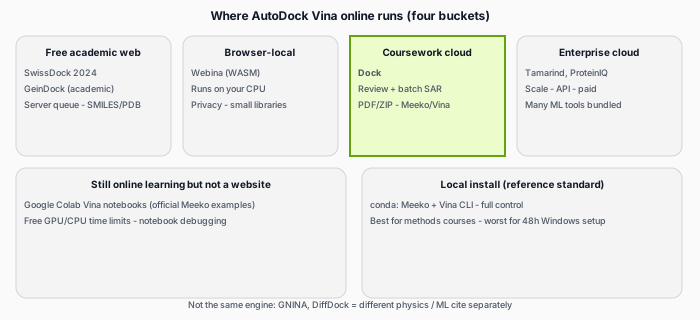
Before comparing brands, confirm the assignment requires AutoDock Vina specifically. If it says “DiffDock” or “GNINA,” those are different programs — using Dock (Vina) would be the wrong methods section even if the UI looks similar.
Checklist: what coursework-friendly online Vina should include
| Requirement | Why markers care |
|---|---|
| Named AutoDock Vina version | Methods must match execution |
| Receptor prep documented | Protonation, PDBQT (Meeko is modern standard) |
| Defined binding box | Reproducible search space |
| SMILES or SDF batch | SAR assignments (10–40 compounds) |
| Downloadable poses + complexes | PyMOL figures for report |
| Interaction analysis | H-bonds, not score alone |
| Manifest / log file | Box center, pH, parameters for TA audit |
Dock was designed around this checklist (Review before credits, run_manifest.json, PLIP tables, PDF + ZIP). Other tools meet subsets — see table below.
Comparison table (student-oriented, 2026)
| Option | Runs Vina? | Cost | Best for | Watch-outs |
|---|---|---|---|---|
| Dock | Yes (Vina 1.x pipeline) | Free tier + paid credits | University SAR reports, batch SMILES, redock check | Not free at scale; rigid receptor; 7-day file retention |
| SwissDock 2024 | Yes (Vina 1.2.5) or Attracting Cavities | Free academic server | Quick exploratory dock, SwissDrugDesign ecosystem | Queue times; less batch-report packaging; cite correct engine if not Vina |
| Webina | Yes (WASM Vina in browser) | Free | Privacy (local CPU), few ligands, no install | Slower than CLI; large screens impractical; PDBQT prep still needed |
| Vina Colab notebooks | Yes | Free (Colab limits) | Learning Meeko + Vina mechanics | Notebook friction; you build your own report bundle |
| Local conda (Meeko + Vina) | Yes | Free compute | Methods courses, full parameter control | Install pain on Windows; you assemble all outputs |
| Tamarind Bio | Yes (hosted Vina) | Commercial | Lab groups, huge screens, API | Overkill for 20-analog homework; subscription cost |
| ProteinIQ / GeinDock / similar | Usually Vina-based | Freemium / academic | Single-structure dock in browser | Compare export formats vs your rubric |
| GNINA (web wrappers) | No (CNN-scored) | Varies | When rubric requests GNINA | Do not call it “Vina” in Methods |
| DiffDock | No (diffusion model) | Varies | Box-free exploratory poses | Different validation; cite model version |
SwissDock 2024 reference: NAR Web Server Issue 2024. Webina: Durrant lab, J. Cheminform. 2020.
Which should you pick?
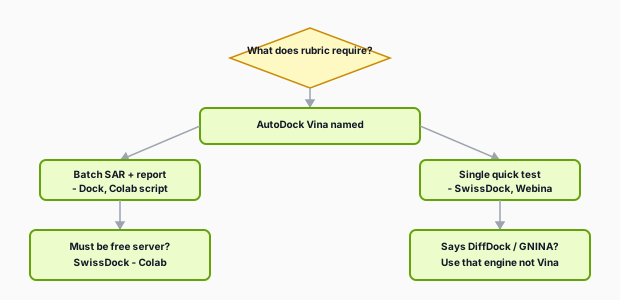
Choose SwissDock if…
- You need a free server, 1–3 ligands, interactive 3D results.
- You already use SwissADME / SwissParam and want one ecosystem.
- You will cite which engine you selected (Vina vs Attracting Cavities 2.0).
Choose Webina if…
- Data must stay on your laptop (WASM runs locally in the browser tab).
- You dock a handful of compounds and do not need a turnkey PDF report.
- You accept ~1.75× slower runs vs command-line Vina per the Webina paper.
Choose Google Colab / local Vina if…
- The course teaches command-line workflows or requires custom Vina parameters.
- You have TA support for conda troubleshooting.
- You want zero per-ligand platform fees for hundreds of compounds.
Choose Dock if…
- You need batch SMILES → ranked table → PDF/ZIP for a Western-style lab report.
- You want Review setup (0 credits) and 3D box preview before spending money.
- You want redock checks, PLIP interactions, PoseBusters QC, and
run_manifest.jsonin one job. - Deadline is soon and conda install failed on your laptop (common).
Walkthrough: step-by-step on Dock · Hub: students online overview.
Choose Tamarind / enterprise clouds if…
- Your PI pays for high-throughput screening (10⁴+ compounds) or multi-tool pipelines.
- You need API batching across structural biology tools — not a typical undergrad worksheet.
Vina vs “AI docking” (GNINA, DiffDock) — do not mix citations
| Program | Search strategy | Score meaning | Homework citation |
|---|---|---|---|
| AutoDock Vina | Grid box you define | kcal/mol empirical score | Default unless told otherwise |
| GNINA | Similar box to Vina | CNN-augmented affinity | Say “GNINA,” not Vina |
| DiffDock | Often no manual box | ML pose confidence | Say “DiffDock” + version/date |
| Attracting Cavities (SwissDock) | Cavity-based | Different objective | Say “Attracting Cavities 2.0” |
P2Rank + Vina is a two-step workflow (pocket prediction, then Vina) — Dock integrates pocketeer for apo pockets in one UI; SwissDock has its own cavity engine option.
Local Vina vs Dock — same engine, different packaging
| Local Meeko + Vina CLI | Dock (cloud) | |
|---|---|---|
| Install | conda, Meeko, possibly ADFR tools | Browser only |
| Cost | Electricity + your time | Credits per batch |
| Control | Every Vina flag | Fixed exhaustiveness 8, top 3 poses |
| Outputs | You build ZIP/PDF | Auto report + manifest |
| Learning value | High for comp chem careers | High for finishing coursework fast |
| Batch 30 analogs | Scripting skill needed | One form submit |
Methods sentence when you used Dock (online Vina)
Molecular docking was performed with AutoDock Vina (exhaustiveness 8) using the Dock web platform (Meeko receptor/ligand preparation, dimorphite_dl protonation at pH 7.4, rigid receptor). This constitutes an online Vina workflow equivalent to local Meeko+Vina with managed compute and standardized outputs.
Adjust if your instructor requires literal local CLI execution.
Same homework on SwissDock vs Dock (what differs in practice)
Imagine a typical task: holo kinase PDB, redock erlotinib, dock five student-drawn analogs, hand in Methods + table + one PyMOL figure.
| Step | SwissDock 2024 | Dock |
|---|---|---|
| Receptor upload | Web form; SwissParam history helps | PDB ID fetch + Meeko prep in pipeline |
| Ligand input | Often one ligand per job or small sets | Batch SMILES, one per line, single ranked PDF |
| Box | Interactive; cavity or box modes | 3D preview in Review setup (0 credits) |
| Report for TA | You assemble figures manually | PDF + ZIP + run_manifest.json + PLIP table |
| Cost at n = 12 | Free server time (queue) | 3 credits (ceil(12/5)); refunds only on service failure |
Neither replaces reading the primary paper for your target — both need you to justify the pocket in the Introduction.
Local install: when it is still worth the pain
Choose conda + Meeko + Vina if: your PI requires exact CLI flags, you dock hundreds of ligands regularly, or the course grades a shell script. Typical student path: try Colab notebook once, use Dock or SwissDock for the graded report, revisit local install in a research placement. Windows users: budget an evening for WSL or university VM — document the environment in Methods if the TA requires it.
FAQ (tool choice)
| Question | Answer |
|---|---|
| Is Dock “real” Vina? | Yes — AutoDock Vina with Meeko prep; exhaustiveness 8, top poses exported; cite Vina + platform in Methods. |
| Can I cite SwissDock and run Dock? | No — cite the engine that executed your poses. |
| Webina offline? | Runs in-browser WASM; tab must stay open; good for privacy, weaker for batch SAR PDFs. |
| DiffDock for “online Vina” assignment? | Only if rubric allows; otherwise you fail the software requirement. |
Red flags when evaluating any “Vina online” site
- No mention of Vina version or prep pipeline — black-box “affinity score” only.
- No downloadable pose files — cannot make PyMOL figure.
- No way to set or visualize the binding box — high wrong-pocket rate.
- Claims experimental Ki or “drug approval” from docking alone.
- Upload-only web form with no manifest — TA cannot verify settings.
Suggested workflow on Dock (summary)
- Sign in at Dock.
- PDB ID + SMILES (or SDF batch).
- Review setup (free) → fix chain/box.
- Redock on holo → Run docking.
- Download PDF + ZIP within 7 days.
Pricing: plans & credits · Interpret output: affinity & poses · Screen library: class screening guide.