What Is Molecular Docking? Run AutoDock Vina Online (No Install)
If you landed here from a Google search for molecular docking online or AutoDock Vina no install, you are probably on a deadline — not writing a PhD methods chapter. This page is the student hub: what docking is, why browser workflows exist, how Dock runs real Vina + Meeko for coursework, and where to read deeper guides on structure choice, preparation, batch screening, and interpreting scores.
What is molecular docking (in one lab paragraph)?
Molecular docking predicts how a small molecule (ligand) fits into a binding site on a protein (receptor) and assigns a score related to binding strength. University labs in medicinal chemistry, biochemistry, pharmacy, and toxicology use it to:
- Propose a 3D binding pose for a designed analog
- Rank a series of compounds (SAR table)
- Discuss hydrogen bonds and hydrophobic contacts — with explicit limitations
The engine most rubrics name is AutoDock Vina: fast rigid-receptor docking suitable for 1–50 ligands, not for MD or covalent mechanisms unless the course says otherwise.
Run the workflow on our automated molecular docking webserver — no local Vina install required.
Why students search “online docking” (real reasons)
| Pain point | What goes wrong locally | What online tools optimize |
|---|---|---|
| Install hell | conda, Meeko, RDKit on Windows; “works on my Mac” lab scripts | Server-side prep; you paste SMILES + PDB ID |
| Box / chain mistakes | Silent wrong-pocket poses | 3D preview + validation before spend |
| Deliverables | You stitch PyMOL + Word yourself | PDF + ZIP + interaction figures in one job |
| SAR deadline | 30 sequential CLI runs | One batch job, parallel Vina workers |
| Trust | Black-box “AI docking” scores | Vina + cited prep (Meeko, RDKit) in manifest |
Alternatives students also use: SwissDock, Google Colab Vina notebooks, Webina (WASM in-browser), and commercial hosts — comparison in AutoDock Vina online tools.
Local install vs online — honest trade-offs
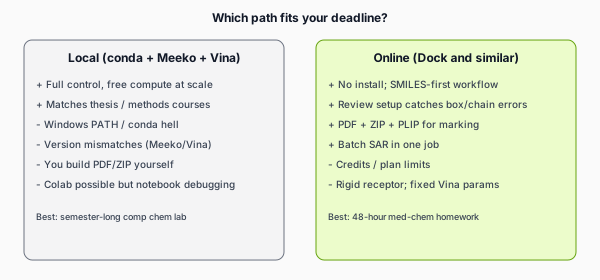
Learning local Vina + Meeko is valuable for research careers. Finishing this week’s SAR table is a different problem. Colab notebooks from the official Vina docs are free and educational but still require notebook debugging time.
Student learning map (read in this order)
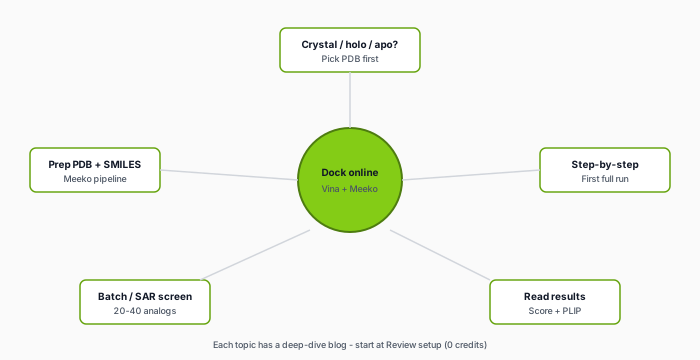
| Your question | Deep-dive article |
|---|---|
| Do I need a crystal structure? | Holo, apo, AlphaFold |
| How do I prep PDB and SMILES? | Receptor & ligand preparation |
| First docking assignment step-by-step | Step-by-step tutorial |
| 20–40 analog SAR project | Virtual screening for class |
| What does −7 kcal/mol mean? | Interpret affinity & poses |
| SwissDock vs Dock vs Colab? | Online tool comparison |
| Toxicology / ADMET angle | Docking in toxicology coursework |
| 4-week study plan | Learning roadmap |
Typical Dock workflow (coursework-sized)
- Target: PDB ID or upload — prefer holo when available.
- Ligands: one SMILES, batch lines, or SDF library.
- Binding site: co-crystal center, residue anchors, predicted apo pocket, or custom box.
- Review setup (0 credits): chain, pH 7.4, ligand TORSDOF warnings, 3D box view.
- Redock co-crystal when present — sanity before analog screens.
- Run docking: Vina exhaustiveness 8, top 3 poses per ligand exported.
- Download PDF + ZIP within 7 days; build SAR table + 2–3 figures.
Detailed steps: step-by-step docking.
What you get back (marking-friendly)
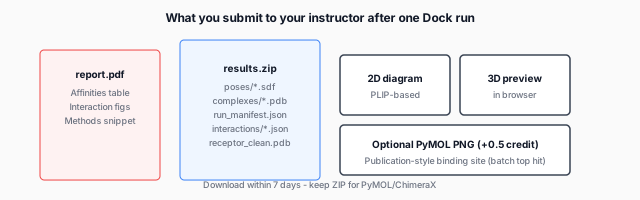
- PDF report — affinity table, pose QC summary, embedded interaction figures.
- results.zip —
run_manifest.jsonfor Methods, SDF poses, complex PDBs, PLIP JSON, ADMET JSON. - Pose confidence — score gap between modes 1 and 2 + PoseBusters flags.
- Optional PyMOL PNG (+0.5 credit/job) for publication-style binding-site render on batch top hit.
File-by-file list on the home page under Features. How to read scores: interpret results.
What to write in your lab report (checklist)
- Methods: PDB ID, chain, protonation pH, box definition, Vina version/settings, Meeko/RDKit prep
- Results: table of ligands with affinity (kcal/mol), top pose figure, key interactions
- Discussion: SAR trend tied to substituents + interactions, not score alone
- Limitations: rigid receptor, no experimental binding, approximate scoring
- Failures: ligands that did not embed/dock — list them
Markers penalize “computational proof of drug activity” language. Use “computational hypothesis” or “in silico ranking.”
Credits and plans (quick reference)
Review / validate only = 0 credits. Docking cost:
- 1 credit for 1–3 ligands
- Then
ceil(ligands ÷ 5)credits (e.g. 25 ligands = 5 credits) - +0.5 credit/job for optional PyMOL figures
Free tier: 1 credit/month, max 3 ligands/job — pilot only.
Student plan: 10 credits/month, batch up to 30 ligands.
Screening Pack (one-time): 8 credits — sized for ~40-ligand project.
Full tables: pricing · SAR planning: virtual screening guide.
Credits refund only if the platform fails to deliver your report/ZIP — not when individual ligands fail (embedding, no poses, etc.).
What Dock does not replace
- Experimental IC50, Ki, or cell assays
- Flexible induced-fit docking or MD
- Covalent / metalloprotein specialist workflows (unless your course simplifies them)
- Guaranteed “correct” pose — always visualize
Pipeline version and limitations are documented per job (aligned with backend v1.9.x capabilities).
48-hour emergency plan
- Hour 0–2: pick holo PDB + 15–25 SMILES analogs; read structure FAQ.
- Hour 2–3: Review setup free; fix chain/box; redock must pass.
- Hour 3–6: submit batch; download ZIP when done.
- Hour 6–12: sort table, PyMOL figures for top 3, draft Discussion from PLIP.
- Hour 12+: proofread limitations; submit PDF + ZIP link/attachment per rubric.
FAQ — short answers
Is online docking “cheating”?
Only if your syllabus forbids it. Most courses allow computational servers if you cite the software and understand the method. When unsure, email the TA with: “I plan to use AutoDock Vina via Dock (Meeko prep, rigid receptor) — is that acceptable?”
Do I need PyMOL if Dock gives figures?
Dock supplies 2D interaction diagrams and overview PNGs. Many rubrics still want one 3D overlay you made — open complexes/*_complex.pdb from the ZIP in PyMOL or ChimeraX (free for students).
Can I dock peptides or macrocycles?
Often problematic: high TORSDOF, embedding failures. Check validate warnings; simplify inputs or ask your instructor for a specialized workflow.
Why did my friend get different scores locally?
Different box size, pH, protonation, Vina exhaustiveness, or receptor chain — compare run_manifest.json, not gossip scores.
Is AlphaFold OK for the receptor?
Sometimes — check binding-site pLDDT and cite the model. Details: crystal structure guide.
Start now
Open the Dock app → enter PDB + SMILES → Review setup → dock. If you are new, read step-by-step tutorial next; if you are batch-screening analogs, jump to virtual screening for class.