Free Molecular Docking Course Path: 4-Week Student Roadmap
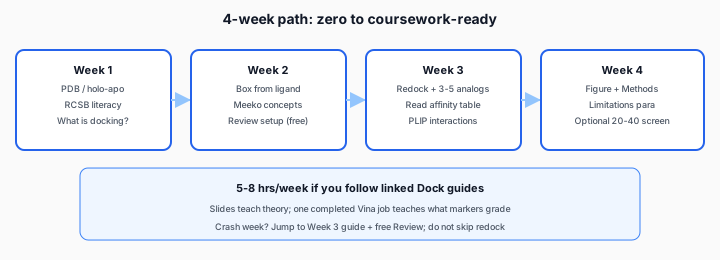
“How to learn molecular docking” shows up next to lecture PDFs, YouTube playlists, and panic posts the week before a lab is due. You do not need a PhD in computational chemistry to pass a coursework docking report — you need a thin stack of skills in order: read a PDB, define a binding site, run AutoDock Vina once correctly, interpret poses honestly, and write Methods markers can audit. This four-week roadmap links every step to a Dock guide so theory slides and one real job reinforce each other.
Who this is for (and who should skip ahead)
- Full roadmap: Medicinal chemistry, biochemistry, pharmacy, toxicology undergrads with 2–4 weeks and no prior Vina experience.
- Skip to Week 3: You already use PyMOL and PDB IDs — go straight to step-by-step docking after one evening on prep concepts.
- Skip to Week 4: You finished a run but lost marks on interpretation — read affinity & pose quality and fix your Discussion.
Budget 5–8 hours per week if you follow the linked articles; a crash weekend is possible only if you already understand holo structures and do not skip redock.
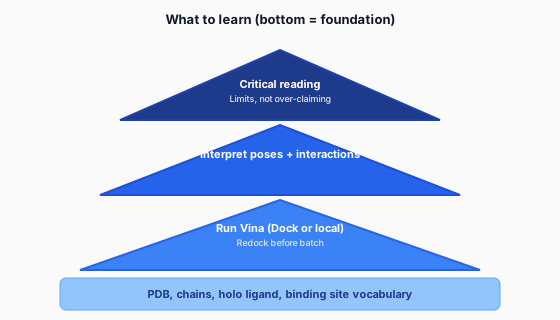
The skills stack (what “learn docking” actually means)
Week 1 — Structures and PDB literacy
Goal: Open a PDB file and explain holo vs apo, resolution, and which chain your ligand binds to.
Read (2–3 hours)
- Interpret docking scores & poses — scoring, rigid receptor, what Vina optimizes.
- Crystal structure FAQ — holo vs apo, redock RMSD benchmarks, AlphaFold caveats.
Do (2–4 hours)
- At RCSB, download two structures for the same target: one holo (ligand bound), one apo if available.
- In PyMOL or Mol* (RCSB viewer): show cartoon, surface pocket, highlight co-crystal ligand.
- Write 5 bullet notes: PDB ID, resolution, organism, ligand name, why holo is better for rigid docking.
Deliverable: One-page “target brief” you can paste into an Introduction later.
Week 2 — Binding sites and preparation concepts
Goal: Define a binding box from a co-crystal ligand and understand Meeko / protonation at a high level (no conda required yet).
Read
- Receptor and ligand preparation — PDBQT, pH 7.4, why protonation changes poses.
Do
- On paper or PyMOL: mark box center on your holo ligand; estimate ~20 Å cube.
- Sign in to Dock → enter your assignment PDB ID → paste one reference SMILES → click Review setup (0 credits).
- Fix wrong chain or box before spending credits — this is the highest-ROI step in the whole course.
Deliverable: Screenshot of 3D preview with box enclosing the co-crystal site (for Methods figure).
Week 3 — First real Vina run
Goal: Redock passes; 3–5 analogs docked; you can read affinity + interaction tables.
Follow
- Step-by-step on Dock — PDB ID, SMILES batch, redock, Run docking.
- Batch input: one SMILES per line (names become
ligand_1,ligand_2in outputs). - Credits: 1–3 ligands = 1 credit; 4+ ligands =
ceil(n/5); optional PyMOL figure +0.5 credit.
Quality checks
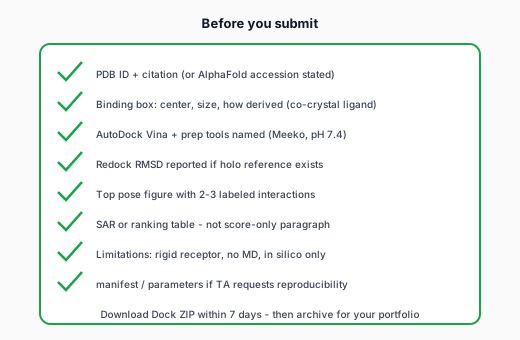
- Redock top pose RMSD ≤ ~2 Å vs co-crystal ligand before trusting analog ranks.
- Read interpreting affinity and poses — PoseBusters flags, PLIP, when to distrust #1 score.
- Download PDF + ZIP within 7 days; archive locally for your portfolio.
Deliverable: Draft results table (compound, score, 2 interactions) + one PyMOL still.
Week 4 — Report, limitations, optional screen
Goal: Submission-ready Methods + Discussion; optional 20–40 compound screen if rubric asks for SAR breadth.
Write
- Methods: Vina version path, exhaustiveness 8 (Dock default), Meeko, pH, box size, number of ligands.
- Results: table + figure — not a paragraph of raw kcal/mol values.
- Limitations: rigid receptor, no MD, in silico only; one proposed experiment.
Optional stretch
- Virtual screening assignment guide — Screening Pack (8 credits ≈ 40 ligands).
- Toxicology angle: docking + ADMET in toxicology reports.
Deliverable: Full lab report section or poster slide set.
“Molecular docking PPT” vs hands-on (what actually sticks)
University slides teach thermodynamics and algorithm cartoons; they rarely teach which PDB to pick or why redock failed. Efficient learning path:
- Skim slides for vocabulary (pose, score, receptor).
- Complete one Dock job with manifest and PDF report.
- Re-read slides — they will map to steps you already performed.
Online tool landscape when conda breaks: AutoDock Vina online comparison. Student hub: molecular docking for students online.
Local install: when to add it (Week 5+)
Not required for most intro assignments. Consider local Meeko + Vina after you can interpret one cloud report — reasons: thesis work, custom exhaustiveness, offline HPC. Until then, browser Vina on Dock or Webina avoids conda debugging weeks.
One-week crash schedule (lab due Friday)
| Day | Focus | Hours |
|---|---|---|
| Mon | PDB + holo/apo notes; read crystal structure FAQ | 2 |
| Tue | Prep article + Dock Review setup (free) | 2 |
| Wed | Redock + 3–5 analogs; download ZIP | 3 |
| Thu | PyMOL figure + results table + PLIP bullets | 3 |
| Fri | Methods + limitations; proofread | 2 |
Do not spend crash day fighting conda unless the rubric mandates CLI output.
Common mistakes by week
| Week | Mistake | Fix |
|---|---|---|
| 1 | Apo PDB with no site literature | Switch to holo or cite pocket paper |
| 2 | Box floating in solvent | Re-center on co-crystal ligand in Review |
| 3 | Batch before redock passes | Fix setup first; save credits |
| 4 | Score-only Discussion | Add interactions + limitations |
FAQ from office hours
| Question | Short answer |
|---|---|
| Do I need Linux? | No for Dock; local Vina works on Windows/macOS with conda patience. |
| Is docking “AI”? | Vina is physics-inspired scoring; cite AutoDock Vina, not ChatGPT. |
| Can I use AlphaFold? | Often yes with limitations — see crystal structure FAQ. |
| How many ligands for homework? | Usually 5–15; screening modules 20–40; match rubric. |
| What if redock fails? | Fix box, chain, holo choice before docking analogs — do not hide failed RMSD. |
All guides in learning order
After the course: what to learn next
If you enjoyed the assignment, add skills in this order: (1) MD snapshots for pocket flexibility (outside standard Vina homework), (2) FEP or relative binding free energy in a graduate elective, (3) Python automation for PDB cleaning. For most BSc portfolios, three well-documented Dock reports with honest limitations beat a half-working conda environment you cannot reproduce six months later.
Start Week 2 now: Dock app · plans & credits.