Prepare Receptor & Ligands for AutoDock Vina Online (PDB → PDBQT)
Most “docking failed” threads are not Vina bugs — they are preparation failures: wrong chain, stripped cofactor, protonation mismatch, or a search box that does not enclose the real pocket. AutoDock Vina reads PDBQT for both receptor and ligand; in modern workflows those files are almost always built with Meeko (Forli lab, Scripps). This guide walks through what students and early researchers actually struggle with on forums, how each step affects pose quality, and how Dock automates the same pipeline you would run locally.
Prerequisite reading: Do you need a crystal structure (holo vs apo)?
The full preparation pipeline (one picture)
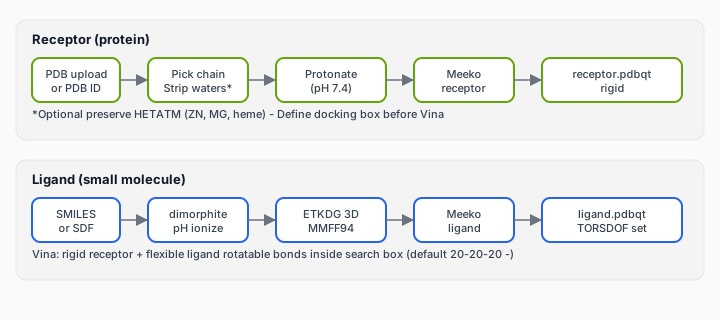
Official Meeko tutorials: Basic docking with Meeko · CLI receptor prep: mk_prepare_receptor.py.
What students ask before they ever click “Run”
| Forum-style question | Root cause | What to do |
|---|---|---|
| “mk_prepare_receptor valence error” | Clashing atoms after PDBFixer, missing heavy atoms, non-standard residues | Inspect binding-site gaps; avoid unminimized PDBFixer output; try another PDB conformer |
| “Which chain do I keep?” | Multi-chain PDB (dimers, fusion constructs) | Pick the chain with the ligand or the longest single chain; cite chain ID in Methods |
| “Do I delete the co-crystal ligand?” | Confusion about holo files | Use it to define the box; remove it from the receptor before docking analogs (unless redocking it) |
| “SMILES vs SDF?” | 2D vs 3D input | SMILES is fine — pipeline builds 3D; SDF preserves names for multi-compound uploads |
| “Why are all my poses outside the protein?” | Box center wrong | Recenter on co-crystal or literature residues; preview box in 3D |
| “Redock RMSD huge on holo” | pH, tautomer, box size, wrong ligand chemistry | Match protonation to prep; exhaustiveness ≥ 8; verify SMILES matches co-crystal ligand |
Step 1 — Start from the right PDB
Download from RCSB PDB or upload your own file. Prefer a holo structure when available (see our crystal structure guide). Check resolution, organism, and whether the binding site has missing backbone coordinates — Vina cannot rebuild unresolved loops.
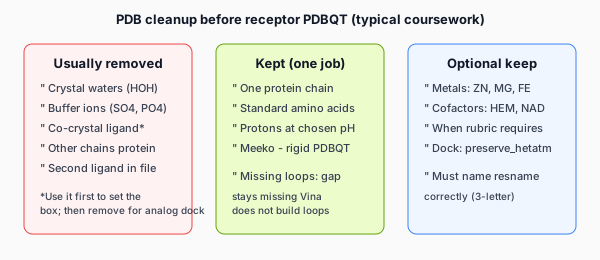
Chain selection (multi-chain PDBs)
Vina jobs here use one protein chain per receptor. If the PDB has multiple protein chains and you do not pick one, validation stops with a chain-selection error — this mirrors how most teaching labs run single-chain receptors.
- Recommendation logic: prefer the chain that carries a co-crystal ligand; otherwise the longest protein chain.
- Dimers (e.g. HIV protease): confirm whether the rubric wants one chain or the biological dimer — if dimer, you may need a different PDB assembly or instructor guidance.
- Methods line: “Chain A was retained as the receptor; other chains were removed.”
Preserve HETATM when the rubric requires cofactors or metals
Metalloproteases, heme enzymes, and some kinases need ZN, MG, HEM, etc. in the receptor. List three-letter residue names to preserve (e.g. ZN, MG). If you strip a metal the protein needs, poses may look plausible in the viewer but be chemically meaningless.
What Dock does to the receptor (transparent prep)
- Download or accept uploaded PDB.
- Resolve one protein chain (user-selected or recommended).
- Write
receptor_clean.pdb— protein chain + optional preserved hetero groups; waters and other chains dropped. - Protonate at job pH (default 7.4).
- Meeko
Polymer.from_pdb_string→ rigidreceptor.pdbqt(flexible side-chain receptors are not supported in this pipeline).
Local equivalent:
mk_prepare_receptor.py -i receptor_clean.pdb -o rec -p -vMeeko expects chemically reasonable protein inputs. A common GitHub issue: PDBFixer adds atoms that clash; RDKit infers extra bonds → “explicit valence” failures (Meeko #330). Minimize or use a clean crystallographic PDB when possible.
Step 2 — Define the binding site (search box)
Vina only searches inside a 3D box. Wrong box = poses in solvent or wrong groove — the most common “software is broken” report on student forums.
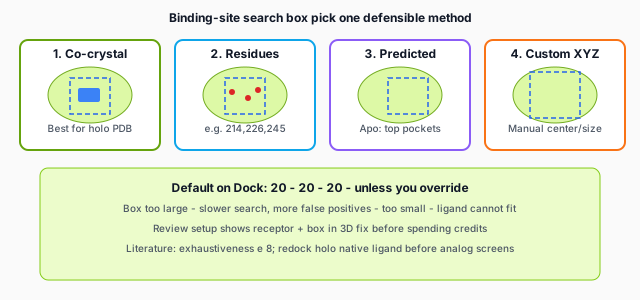
Method A — Co-crystal ligand (best default on holo PDB)
Center the box on heavy atoms of the bound ligand in the uploaded PDB. Default size on Dock is 20 × 20 × 20 Å — reasonable for many drug-like ligands. Literature suggests scaling box size with ligand size (e.g. ~2.9× radius of gyration in some benchmarks); if analogs are much larger than the co-crystal ligand, expand the box slightly and note it in Methods.
Method B — Pocket residue anchors
Enter residue numbers (e.g. 214,226,245) on the selected chain; the box center is the centroid of their Cα atoms. Use when the instructor gives catalytic residues or you removed the co-crystal ligand but know the site from papers.
Method C — Predicted pockets (apo structures)
When no ligand is in the file, pocket detection (Pocketeer) returns up to three ranked pockets. Pick the pocket that matches literature, not only rank #1. Apo pockets are hypotheses — compare with holo homologs when possible.
Method D — Custom center and size
Advanced: paste XYZ center and edge lengths from PyMOL, ChimeraX, or a published grid table. Use when migrating a collaborator’s Vina config file.
Box quality checks
- Preview receptor + box in Review setup — ligand-sized box should sit inside the visible pocket.
- Apo disclaimer: if the pocket looks collapsed, consider a holo PDB or cite induced-fit limitations.
- Warn if the box center is far from the protein — usually a typo in coordinates.
Step 3 — Prepare ligands (SMILES, SDF, protonation, 3D)
Vina needs ligand PDBQT with atom types, partial charges, and rotatable bond roots (TORSDOF). Starting from 2D SMILES is standard in teaching labs.
Input formats on Dock
| Input | Format | Naming in reports |
|---|---|---|
| Single compound | One SMILES + optional display name | Your label (e.g. compound_3) |
| SAR / class batch | One SMILES per line; lines starting with # ignored |
Auto: ligand_1, ligand_2, … |
| SDF library | Multi-record .sdf (delimiter $$$$) |
Title line from SDF or ligand_n |
Platform cap: 300 ligands per job; your plan sets a lower batch limit. Duplicate SMILES in a textarea are flagged at parse time.
Ligand pipeline (what happens under the hood)
- Validate SMILES with RDKit.
- Protonate at ligand-specific pH or job default (7.4) via dimorphite_dl — ionization affects H-bonds and score.
- Embed 3D with ETKDGv3, add hydrogens, MMFF94 minimize.
- Meeko
MoleculePreparation→ write ligand PDBQT + TORSDOF. - Optional ADMET flags (RDKit descriptors) for report tables — not experimental ADMET.
Local equivalent: mk_prepare_ligand.py -i ligand.sdf -o ligand.pdbqt. Meeko strongly prefers SDF over mol2 for bond-order fidelity.
TORSDOF — when ligands are “too flexible”
TORSDOF counts active rotatable bonds Vina must search. High values → slow runs and unreliable poses.
- Warning if TORSDOF > 12 (typical teaching threshold).
- Strong warning if TORSDOF > 20 — consider simplifying the molecule or splitting the assignment.
Macrocycles and very flexible side chains are common failure modes in rigid-receptor Vina homework — state that limitation rather than over-interpreting a single affinity score.
Protonation pH — stop guessing
Assignments often say “pH 7.4” without explaining impact. Basic amines and carboxylates change protonation state → different 3D H-bond network. For a series of analogs, use the same pH for every ligand in one batch. If redocking a co-crystal ligand, mismatched protonation is a top reason for RMSD > 2 Å despite a correct box.
Step 4 — Redock before you screen analogs
On holo structures, dock the known co-crystal ligand once before screening 20–50 analogs:
- Top pose RMSD ≤ 2 Å vs crystal (heavy atoms) → prep + box are plausible.
- Failure → fix receptor, box, pH, or ligand representation before spending credits on the class library.
- Large batches: run redock in validation; turn off repeating redock for every analog once sanity check passes.
Read more: interpreting affinity and pose quality.
Step 5 — Review setup, then Vina
Dock uses a two-step flow:
- Review setup (0 credits) — protein chain, box source, ligand prep warnings, 3D preview, optional redock report.
- Run docking — Vina with default exhaustiveness 8, top poses exported;
run_manifest.jsonrecords box, pH, chain, and prep for your Methods section.
Changing only ligands reuses cached protein validation in the browser session — you do not re-download the PDB for each analog batch tweak.
Troubleshooting matrix
| Symptom | Likely prep issue | Fix |
|---|---|---|
| Receptor prep error / valence | Bad PDB geometry, missing atoms | New PDB entry; avoid clashing PDBFixer; check non-standard residues near site |
| No pockets found | Apo file corrupted or protein-only fragment | Verify PDB; try homolog holo for box definition |
| Ligand prep failed | Invalid SMILES, exotic chemistry | Draw in ChemDraw/Marvin; export SDF; simplify structure |
| Identical scores for all analogs | Same SMILES pasted twice; wrong batch paste | Check parse preview; remove duplicates |
| Affinity rank makes no chemical sense | Wrong pocket or high TORSDOF | Visualize top pose; check interactions, not score alone |
| Metal-dependent binding gone | ZN/HEM stripped | Re-run with preserve HETATM |
Methods block (copy and edit)
The receptor was prepared from PDB [ID] (chain [X], protonation pH 7.4) using Meeko to PDBQT format (rigid receptor). Waters and ligands were removed except [ZN/MG if preserved]. The AutoDock Vina search grid was centered on [co-crystal ligand / residues 214,226,245 / predicted pocket rank 1] with box dimensions 20×20×20 Å. Ligands were built from SMILES using dimorphite_dl ionization at pH 7.4, RDKit ETKDG embedding, MMFF94 minimization, and Meeko PDBQT conversion. Docking used exhaustiveness 8; top poses were ranked by Vina affinity (kcal/mol).
Local vs online prep — when to use which
- Local Meeko + Vina: learning CLI, custom flexible receptors, HPC batch jobs.
- Dock: no conda install, 3D box preview, batch PDF/ZIP for coursework, redock validation before credits.
Next: step-by-step docking tutorial · AutoDock Vina online tools comparison · what is in the results ZIP on the home page.