How to Do Molecular Docking: Step-by-Step Tutorial for Students
This is the hands-on tutorial for running AutoDock Vina + Meeko on Dock in the browser. You will go from zero to a submittable PDF + ZIP. Estimated time: 45–90 minutes for a first single-ligand run; half a day for a 20-analog class screen after prep is understood.
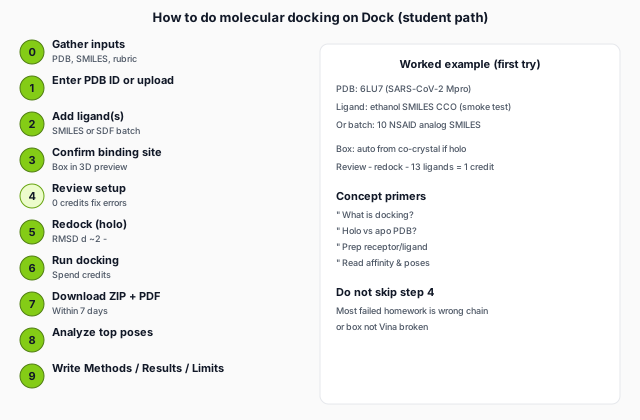 molecular docking on Dock from inputs to lab report" width="640" height="420" loading="lazy" />
Step 0 — Gather inputs before opening Dock
| Item | Where to get it | Notes |
|---|---|---|
| Protein structure | RCSB PDB ID or .pdb file | Prefer holo; read holo vs apo |
| Ligand(s) | SMILES or .sdf | One SMILES per line for batch; see prep guide |
| Binding site rationale | Co-crystal, paper, or predicted pocket | One sentence for Methods |
| Rubric | Syllabus / TA instructions | # compounds, figures, report length |
| Account / credits | Dock sign-in + plan | Free: 3 ligands/job; Review = 0 credits |
Step 1 — Load the receptor
- Open the Dock home page and sign in (required before Run docking).
- In the protein field, enter a 4-character PDB ID (e.g.
6LU7for SARS-CoV-2 main protease) or upload a.pdbfile. - If the structure has multiple protein chains, Dock will ask you to pick one — choose the chain with the co-crystal ligand or the chain your instructor names.
Structure tips: resolution < 2.5 Å when possible; note whether your ligand of interest is already in the PDB (holo). Missing loops in the pocket cannot be fixed by docking — pick another PDB entry or state the limitation.
Step 2 — Add ligand(s)
Single-ligand homework (smoke test)
- Mode: single ligand.
- Name: e.g.
ethanol_test. - SMILES:
CCO(quick parse check) or your assigned structure.
Batch SAR assignment
- Switch to batch / screening mode.
- Paste one SMILES per line (lines with
#are comments). - Or upload a multi-record SDF — compound names come from the SDF title line.
- Watch the ligand count vs your plan limit (Free 3 · Student 30 · etc.).
Dock canonicalizes SMILES with RDKit; you do not need to draw PDBQT by hand.
Step 3 — Define the binding site (search box)
Dock must know where the ligand is allowed to search. Pick one method:
| Method | When to use | On Dock |
|---|---|---|
| Co-crystal ligand | Holo PDB (default best) | Auto-centered on bound ligand |
| Pocket residues | Paper gives residue numbers | Advanced → e.g. 214,226,245 |
| Predicted pocket | Apo only | Select rank 1–3 from pocketeer list |
| Custom XYZ | TA gave coordinates | Advanced → center + box size (Å) |
Default box size is 20 × 20 × 20 Å — fine for many drug-like ligands. Enlarge only if your analogs are much larger than the co-crystal ligand, and mention it in Methods.
Step 4 — Advanced options (expand before Review)
- Protonation pH — default 7.4; match your lab protocol.
- Preserve HETATM — e.g.
ZN,HEMif the rubric requires metals/cofactors. - Co-crystal redock — on by default for single ligand; for batch, enable in Advanced after you trust the box.
- PyMOL figure — optional +0.5 credit/job; publication-style PNG for top hit.
Step 5 — Review setup (0 credits)
Click Review setup (not Run docking yet). Dock validates protein, box, and every ligand without charging credits.
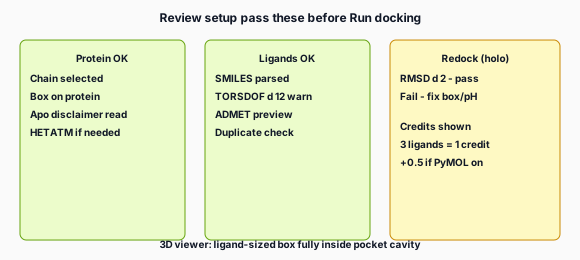
Fix common blockers before continuing:
- Chain required — select protein chain from dropdown.
- Invalid SMILES — fix typos in that line.
- High TORSDOF — simplify structure or expect ambiguous poses.
- Box far from protein — re-center on co-crystal or residues.
- Apo structure — read the pocket disclaimer; confirm site with literature.
Changing only ligands after a successful Review reuses cached protein validation in your browser session — no need to re-download the PDB.
Step 6 — Redock check (holo structures)
If a co-crystal ligand is detected, Dock can redock it and report RMSD vs the crystal pose.
- Pass (≤ ~2 Å): proceed to full run or analog screen.
- Fail: adjust pH, box, chain, or PDB; do not dock 30 analogs on a broken setup.
Redock validates the workflow, not your new analogs. Details: interpret results.
Step 7 — Run docking (spend credits)
When Review shows ready, click Run docking. Credits are charged at submit based on ligand count:
- 1–3 ligands → 1 credit
- 4+ ligands →
ceil(n ÷ 5)credits (+0.5 if PyMOL enabled)
Wait for the job queue (priority on Research/Lab plans). Backend runs AutoDock Vina (exhaustiveness 8, top 3 poses exported) with parallel workers for multi-ligand jobs. Failed ligands do not cancel the whole batch.
Large screens: virtual screening for class.
Step 8 — Download and archive results
From the results dashboard:
- Download results.zip — poses, complexes,
run_manifest.json, interactions, figures. - Download the PDF report for printing / submission.
- Copy Methods text if the UI offers one — edit before submitting.
Retention: 7 days on all plans — save files locally the same day.
Step 9 — Analyze poses (30–60 min)
- Open
result.jsonor the PDF table — sort byaffinity_best(more negative = better within this run). - Load
complexes/{ligand}_complex.pdbin PyMOL or ChimeraX — check top pose in pocket. - Read
interactions/{ligand}.jsonor the 2D diagram infigures/. - Note
pose_confidence_label— ambiguous if gap_to_second < 0.5 kcal/mol. - List failed ligands from the summary — include in report.
Step 10 — Write the lab report
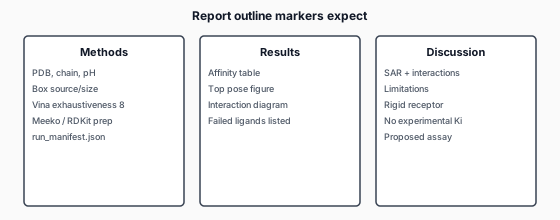
run_manifest.json so Methods matches what you actually ran.Methods (example): Molecular docking was performed using AutoDock Vina (via Dock pipeline v1.9.x, exhaustiveness 8). The receptor was prepared from PDB 6LU7 (chain A), protonated at pH 7.4 with Meeko to PDBQT. The search grid was centered on the co-crystallized inhibitor with dimensions 20×20×20 Å. Ligands were built from SMILES (dimorphite_dl, RDKit ETKDG, MMFF94). Top poses were analyzed with PLIP interaction diagrams and PoseBusters pose QC.
Discussion (example): Compound ligand_12 ranked highest (−8.1 kcal/mol) with a 1.0 kcal/mol gap to the second mode and favorable H-bonding to Asp189. ortho-Substitution (ligand_21) weakened predicted affinity, consistent with steric clash in the modeled pocket. Results are computational hypotheses; cell-based inhibition was not measured.
Worked example: PDB 6LU7 + one ligand (15 min)
- PDB ID
6LU7→ chain with inhibitor (verify in RCSB). - Single ligand SMILES from your assignment (or
CCOfor parse test). - Review setup → confirm box on protease active site.
- Redock if co-crystal present.
- Run docking (1 credit).
- Download ZIP; open complex in PyMOL; screenshot for report.
Common mistakes (avoid)
| Mistake | Fix |
|---|---|
| Run docking without Review | Always Review first (0 credits) |
| Wrong chain on dimer | Pick chain with ligand |
| Huge box “just in case” | Tight box around pocket |
| Skip redock on holo | Fix setup before analog batch |
| “Proved binding” language | Say “predicted” / “computational” |
| Lost ZIP after 7 days | Download same day |
Local Vina instead of Dock?
If your course requires command-line Vina, the logical steps are the same (prep → box → vina → analyze); only the UI changes. Comparison: online vs local tools. Student hub: molecular docking for students.
Next reads: interpret affinity and poses · 4-week learning roadmap.